
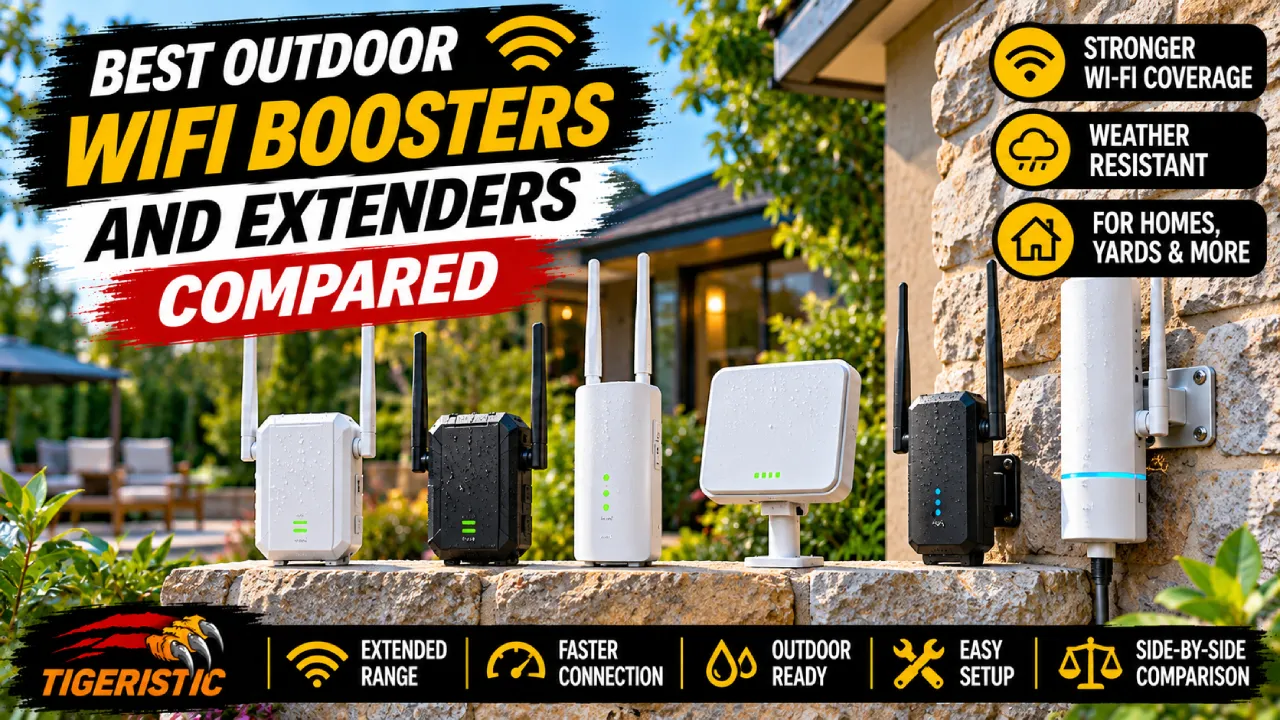
Your router is built to cover the inside of your home, so WiFi usually drops off right at the patio door. An outdoor WiFi booster fixes that, whether you want a strong signal on the deck, across a big yard or inside a barn down the driveway. The right choice depends on where the dead zone is, so this guide covers mesh nodes, access points and bridges.
Short answer: the TP-Link Deco X50-Outdoor is the best outdoor WiFi booster for most homes, the Ubiquiti UniFi U7 Outdoor is the best for long range, and a pair of Ubiquiti NanoStation 5AC Loco units is the best way to reach a separate building.
Best overall
TP-Link Deco X50-Outdoor
IP65 WiFi 6 mesh node that often sells for about $90.
Best long range
Ubiquiti UniFi U7 Outdoor
WiFi 7 with a directional antenna for big yards.
Best for outbuildings
Ubiquiti NanoStation 5AC Loco
A wireless link to a barn, shop or guest house.
How we chose
We compared current outdoor mesh nodes, access points and bridges on weather rating, WiFi standard, wired port speed, power options, range and price. Every pick on this page is marked Researched: we chose it from manufacturer specs and published expert reviews, and none of our team members has used these models at home yet. Scores are our editorial ratings out of 10. How we review
Best Outdoor WiFi Boosters Compared
| Device | Best for | WiFi | Weather rating | Power | Typical price |
|---|---|---|---|---|---|
| TP-Link Deco X50-Outdoor | Most homes | WiFi 6 | IP65 | PoE+ or AC | About $90 to $150 |
| Amazon eero Outdoor 7 | eero homes | WiFi 7 | IP66 | PoE+ or AC bundle | About $350 to $400 |
| Ubiquiti UniFi U7 Outdoor | Long range | WiFi 7 | IPX6 | PoE+ | $199 |
| TP-Link EAP610-Outdoor | Budget access point | WiFi 6 | IP67 | PoE+ or passive PoE | About $130 to $145 |
| Ubiquiti NanoStation 5AC Loco | Second building | 5 GHz bridge | Outdoor rated | 24V passive PoE | About $50 to $75 each |
| TP-Link CPE210 | Cheap bridge | 2.4 GHz bridge | IPX5 | 24V passive PoE | About $40 to $60 each |
Prices are list or typical street prices and change often on Amazon.
6 Best Outdoor WiFi Boosters and Extenders in 2026
1. TP-Link Deco X50-Outdoor
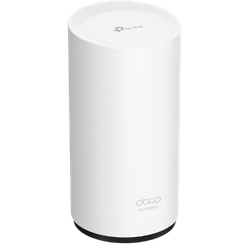
Best for: Most homes that want WiFi on the patio, deck or yard.
- WiFiWiFi 6, dual-band (AX3000)
- Weather ratingIP65
- Wired ports2 Gigabit (PoE in)
- PowerPoE+ or AC power cord
- Works withAny TP-Link Deco mesh
- PriceList $149.99, often about $90
The Deco X50-Outdoor is the easiest way to get real WiFi outside. It joins any TP-Link Deco mesh system as one more node, so your phone keeps the same network name from the living room to the back fence. Trusted Reviews found it almost doubled speeds on one floor of their test home and boosted the second floor by more than seven times.
You can power it with the included AC cord or with one Ethernet cable through PoE+, and it mounts on a wall, a pole or a table. If you do not own a Deco system yet, it can also work as the main unit, but it shines as an add on for an existing Deco setup.
What we like
- Simple setup in the Deco app
- PoE+ or plain AC power
- Often on sale for about $90
Watch out for
- Works best with a Deco system
- WiFi 6, not WiFi 7
Verdict: The best outdoor WiFi booster for most homes, especially if you already use Deco.
2. Amazon eero Outdoor 7
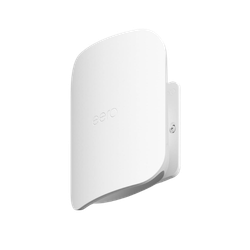
Best for: eero homes and harsh climates.
- WiFiWiFi 7, dual-band (BE2100)
- Weather ratingIP66, -40 to 131°F
- Wired port2.5 Gbps Ethernet
- PowerPoE+ or bundle with power supply
- CoverageUp to 15,000 sq. ft. (rated)
- PriceAbout $350 to $400
The eero Outdoor 7 is built for rough weather. It has an IP66 rating, runs from -40 to 131°F and is rated for 100 mph winds, so it can stay on a fence or wall all year. Inside the eero app it behaves like any other eero node, which makes setup simple.
It is expensive and only dual-band, with modest 2×2 radios and no 6 GHz band. Dong Knows Tech called its WiFi specs unimpressive for the price. It makes sense if you already run eero and want the toughest weatherproof node, not as a value pick.
What we like
- IP66 and a very wide temperature range
- 2.5 Gbps port
- Easy eero app setup
Watch out for
- Expensive
- No 6 GHz band, modest radios
Verdict: The toughest outdoor node for eero homes, at a premium price.
3. Ubiquiti UniFi U7 Outdoor
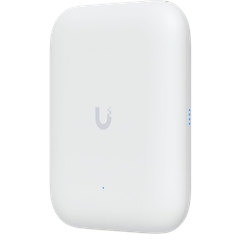
Best for: Big yards, pools and long reach in one direction.
- WiFiWiFi 7, dual-band, 4 streams
- Weather ratingIPX6
- Wired port2.5 GbE (PoE+ in)
- AntennaDirectional built in, omni included
- CoverageUp to 5,000 sq. ft. (rated)
- Price$199 (Ubiquiti list)
The U7 Outdoor has a clever trick: a built in directional antenna that throws WiFi far in one direction, plus included omni antennas you can switch to in software for 360 degree coverage. That makes it great for reaching a pool, dock or the far side of a big lawn.
It is a prosumer device. You need the UniFi app or a UniFi gateway to manage it and a PoE+ switch or injector to power it. It can mesh wirelessly with other UniFi access points if you cannot run a cable.
What we like
- WiFi 7 for $199
- Directional or omni coverage
- 2.5 GbE uplink
Watch out for
- Needs the UniFi system and PoE+
- More setup than Deco or eero
Verdict: The best long range outdoor access point if you are comfortable with UniFi.
4. TP-Link Omada EAP610-Outdoor
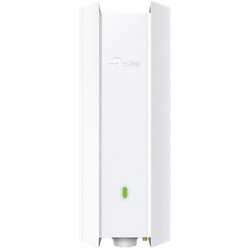
Best for: A rugged access point on a budget.
- WiFiWiFi 6, dual-band (AX1800)
- Weather ratingIP67
- Wired port1 Gigabit Ethernet
- PowerPoE+ or passive PoE
- MeshOmada Mesh
- PriceAbout $130 to $145
The EAP610-Outdoor gives you WiFi 6 in a fully dust tight IP67 enclosure for a lot less than WiFi 7 models. It is a business grade access point, so it suits homeowners and small businesses who want a set and forget unit on the side of a house, barn or shop.
It works on its own through a web page, but it is happiest with TP-Link’s Omada app or controller, which also lets it mesh with other Omada access points. Plan to run an Ethernet cable for the best speeds.
What we like
- IP67, the highest rating here
- WiFi 6 at a fair price
- Omada mesh support
Watch out for
- Business style setup
- Gigabit port only
Verdict: The best value outdoor access point for a permanent install.
5. Ubiquiti NanoStation 5AC Loco (Pair)
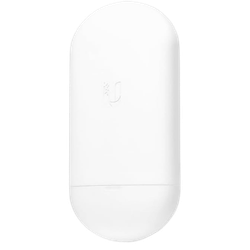
Best for: Sending internet to a barn, shop or second building.
- TypePoint to point bridge
- Band5 GHz airMAX ac
- Antenna13 dBi directional
- Throughput450+ Mbps (rated)
- RangeUp to 6+ miles (line of sight)
- PriceAbout $50 to $75 per unit, buy two
A bridge is the right tool when the place that needs internet is a separate building. You mount one NanoStation on the house and one on the barn, aim them at each other, and they create a wireless cable between the two. Ubiquiti rates the link at 10+ km, so 100 feet or a few hundred yards is easy.
The bridge does not give your phone WiFi by itself. Plug a router, Deco unit or access point into the far end to create WiFi inside the outbuilding. The two units need a clear line of sight, and each one needs 24V passive PoE power, so check whether an adapter is included with the version you buy.
What we like
- Fast, stable link between buildings
- Huge range for the price
- Low cost per unit
Watch out for
- Needs line of sight and careful aiming
- Needs a router or access point at the far end
Verdict: The best way to bring internet to a barn, shop or guest house.
6. TP-Link CPE210

Best for: A cheap 2.4 GHz bridge for basic needs.
- TypeOutdoor CPE, bridge or access point
- Band2.4 GHz, 300 Mbps
- Antenna9 dBi directional
- Weather ratingIPX5
- Ports10/100 Ethernet
- Power24V passive PoE, adapter included
The CPE210 is one of the cheapest ways to link two buildings or cover one direction of a yard. It has a 9 dBi directional antenna, TP-Link rates it for links beyond 5 km, and a passive PoE adapter comes in the box.
It is an older 2.4 GHz design, and its Ethernet ports top out at 100 Mbps, so it cannot pass faster internet plans at full speed. For basic browsing, cameras or a smart sprinkler controller in a shed, it does the job for very little money.
What we like
- Very low price
- PoE adapter included
- Long range for 2.4 GHz
Watch out for
- 100 Mbps Ethernet limits speed
- IPX5 only, not dust rated
Verdict: A budget bridge for light use. Choose the NanoStation 5AC Loco for faster plans.
Which Type of Outdoor WiFi Booster Do You Need?
Outdoor WiFi gear comes in three types, and picking the right one matters more than any spec.
Mesh node: for a patio, deck or yard
A weatherproof mesh node, like the Deco X50-Outdoor or eero Outdoor 7, joins your indoor mesh system and keeps one network name everywhere. It is the easiest choice if the area you want to cover is next to your house.
Access point: for big yards and permanent installs
An outdoor access point, like the UniFi U7 Outdoor or EAP610-Outdoor, is usually wired back to your router with one Ethernet cable that carries both data and power. It gives the strongest and most stable signal over a pool, lawn or parking area.
Bridge: for a barn, shop or second building
A point to point bridge, like the NanoStation 5AC Loco or CPE210, links two buildings with a focused wireless beam. Add a router or access point at the far end to create WiFi inside the building.
Outdoor Weather Ratings Explained
The IP rating tells you how well a device resists dust (first number) and water (second number). An X means the device was not tested for that part.
| Rating | Dust | Water | On this list |
|---|---|---|---|
| IPX5 | Not rated | Water jets | TP-Link CPE210 |
| IP65 | Dust tight | Water jets | TP-Link Deco X50-Outdoor |
| IP66 | Dust tight | Powerful water jets | Amazon eero Outdoor 7 |
| IPX6 | Not rated | Powerful water jets | Ubiquiti UniFi U7 Outdoor |
| IP67 | Dust tight | Short immersion up to 1 meter | TP-Link EAP610-Outdoor |
For a covered porch or the underside of an eave, IP65 or IPX5 is fine. For a fully exposed pole or fence in heavy rain and snow, look for IP66 or IP67.
How to Choose an Outdoor WiFi Booster
Pick the right type first
Decide whether you need a mesh node, an access point or a bridge before you compare specs. The section above explains which one fits your yard or building.
Plan for power
Most outdoor units run on PoE, which sends power over the Ethernet cable. That means one cable from inside the house, but you may need a PoE injector or switch. Units like the Deco X50-Outdoor can also use a normal power cord.
Check the weather rating
Match the IP rating to the spot. Fully exposed mounts need IP66 or IP67, while sheltered spots can get by with IP65 or IPX5.
Mount high with a clear view
Outdoor WiFi travels best with line of sight. Mount the unit high on a wall or pole facing the area you want to cover, and keep trees and metal sheds out of the path.
Stay in your ecosystem
A Deco node only joins Deco, an eero node only joins eero, and UniFi or Omada gear works best with its own app. Sticking with one brand keeps setup and roaming simple.
FAQs: Outdoor WiFi Boosters
How can I boost my WiFi signal outside?
Add a weatherproof mesh node or outdoor access point near the area you want to cover. If you already have a Deco or eero system, the Deco X50-Outdoor or eero Outdoor 7 is the simplest upgrade.
How can I get WiFi to a shed, barn or garage?
If the building is close to the house, an outdoor access point facing it may be enough. For a building farther away, use a point to point bridge like the Ubiquiti NanoStation 5AC Loco and connect a router or access point inside the outbuilding.
What is the best outdoor WiFi extender?
The TP-Link Deco X50-Outdoor is the best for most homes thanks to its IP65 rating, PoE+ support and low sale price. The Ubiquiti UniFi U7 Outdoor is the best long range option.
How do I extend my WiFi signal to another building 100 feet away?
Use a pair of bridge units, one on each building, aimed at each other with a clear line of sight. At 100 feet, even a budget pair works well, and the far unit can feed a router or access point inside.
Can I use an indoor WiFi extender outside?
Not safely. Indoor extenders are not sealed against rain, dust or temperature swings. If you must use one, keep it inside near a window that faces the area you want to cover.
Do outdoor WiFi extenders need an Ethernet cable?
Not always. Deco, eero, UniFi and Omada units can connect to your network wirelessly, but a wired Ethernet connection with PoE gives the fastest and most stable results.
Final Thoughts
For WiFi on the patio or in the yard, the Deco X50-Outdoor is the easy, affordable choice, and the eero Outdoor 7 is the tough premium option for eero homes. For long reach, the UniFi U7 Outdoor is hard to beat at $199. If the dead zone is a separate building, skip extenders and use a NanoStation 5AC Loco bridge. For a weak signal inside the house, see our best WiFi boosters for gaming.
Related WiFi Guides
Update history. November 4, 2026: rebuilt this guide with current models. Added the TP-Link Deco X50-Outdoor, Amazon eero Outdoor 7, Ubiquiti UniFi U7 Outdoor, TP-Link Omada EAP610-Outdoor and Ubiquiti NanoStation 5AC Loco, and kept the TP-Link CPE210. Removed the Netgear Orbi Outdoor satellite (works only with older WiFi 5 Orbi systems), the JOOWIN AC1200 (specs and support could not be verified), the older WAVLINK AC1200, the CC Vector repeater, the EnGenius CPE, the Hawking HOD45B and an unnamed Ubiquiti listing. Added labels, scores, a guide to the three types of outdoor WiFi gear and a weather rating table. Added product photos and direct Amazon links for all picks.