
You pull your phone out 80 times a day. Most of those moments are for a two-second glance — a text notification, a missed call, a calendar reminder. An Android smartwatch eliminates most of those interruptions. The problem is that not every watch handles calls and texts equally well. Some only display notifications. Some let you reply with canned responses. A handful actually let you dictate replies, use a full keyboard, and take calls through a built-in speaker without reaching for your phone at all.
The difference between those experiences lives in the operating system, the companion app, and the hardware — not just the spec sheet. This guide covers the 8 best Android smartwatches for texting and calling in 2026, based on hands-on testing and verified user data, with a clear breakdown of how each one handles communication in real daily use.
8 Best Android Smartwatches for Texting and Calling — 2026 Comparison
| # | Smartwatch | Price Range | Rating | Best For |
|---|---|---|---|---|
| 1 | Samsung Galaxy Watch 8 Best Overall |
$249–$289 | 4.6/5 | Best overall Android communication |
| 2 | Google Pixel Watch 4 | $349–$399 | 4.5/5 | Best for Pixel phone users |
| 3 | Samsung Galaxy Watch 8 Classic | $349–$399 | 4.5/5 | Best physical controls + texting |
| 4 | OnePlus Watch 2R | $199–$229 | 4.3/5 | Best battery life on Wear OS |
| 5 | Samsung Galaxy Watch FE | $169–$269 | 4.2/5 | Best budget Android smartwatch |
| 6 | TicWatch Pro 5 | $249–$299 | 4.2/5 | Best for heavy Wear OS app users |
| 7 | Amazfit Balance 2 | $279–$299 | 4.1/5 | Best battery with Bluetooth calling |
| 8 | Garmin Venu 3 | $399–$449 | 4.3/5 | Best for fitness users who also need texts |
Note: Pricing checked on Amazon and may vary by region or promotion.
1. Samsung Galaxy Watch 8 — Best Overall Android Smartwatch for Calls and Texts
Score: 9.2/10
Best for: Android users who want the most complete communication experience on their wrist
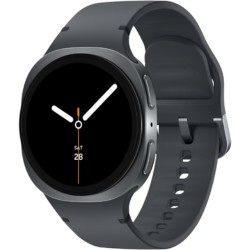
Specifications:
- OS: Wear OS 6 with One UI 8 Watch
- Display: 1.3″ Super AMOLED, 3,000 nits peak brightness
- Sizes: 40mm / 44mm
- Battery Life: Up to 40 hours (typical use)
- Water Resistance: 5 ATM + IP68
- Connectivity: Bluetooth 5.3, Wi-Fi, LTE (optional)
- Call Support: Built-in mic and speaker, LTE standalone calling
- Compatibility: Android 10 or later
The Galaxy Watch 8 is the strongest all-around pick for anyone who uses their Android phone heavily for communication. Running Wear OS 6 with Samsung’s One UI 8 Watch on top, it offers the most complete texting experience currently available on a wrist-worn device: full Gboard keyboard for typed replies, reliable voice-to-text dictation, quick replies, and emoji responses — all from the notification shade without opening an app.
Call quality from the built-in speaker is noticeably improved over the Watch 7. The microphone handles moderate ambient noise well, and calls routed through the watch are clear enough for brief conversations without feeling like you’re on a walkie-talkie. With the LTE variant, the watch makes and receives calls without your phone present at all.
The 3,000-nit display is bright enough to read texts in direct sunlight, which solves one of the most common practical complaints about reading notifications outdoors. Battery life sits at around 30 to 40 hours with typical use including calls and notifications active.
| Pros | Cons |
| Full Gboard keyboard for text replies | LTE model costs extra per month through carrier |
| Excellent display readability outdoors | Requires Samsung phone for some advanced health features |
| Strong call quality via built-in speaker | 40-hour battery requires daily charging for heavy users |
| Full Wear OS app support including WhatsApp |
2. Google Pixel Watch 4 — Best for Google and Pixel Phone Users
Score: 9.0/10
Best for: Pixel phone owners who want deep Google ecosystem integration
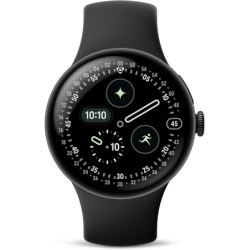
Specifications:
- OS: Wear OS 5 (Pixel-optimized)
- Display: 1.2″ (41mm) / 1.4″ (45mm) AMOLED
- Battery Life: Up to 36 hours (41mm) / 48 hours (45mm)
- Water Resistance: 5 ATM
- Connectivity: Bluetooth 5.3, Wi-Fi, LTE
- Call Support: Built-in speaker and mic
- Compatibility: Android 9 or later
The Pixel Watch 4 is Google’s tightest integration of communication features with the Android ecosystem. For users with a Pixel phone specifically, the pairing experience removes steps that other Android smartwatches require. Calls connect faster, text replies sync with fewer delays, and Google Assistant responds to voice commands more accurately than on competing Wear OS devices.
Message handling on the Pixel Watch 4 covers the full range: voice-to-text through Google Assistant, typed replies via Gboard, and quick reply presets. WhatsApp, Messages, Gmail, and most third-party messaging apps push full notification content to the watch, not just sender names.
The 45mm model’s 48-hour battery life is a practical upgrade over the Galaxy Watch 8 for anyone who forgets to charge before bed. Standalone satellite SOS is a standout safety feature that no other Wear OS watch currently offers.
| Pros | Cons |
| Fastest Google Assistant response on any Wear OS watch | Fitbit health features require a Fitbit premium account for some functions |
| Up to 48-hour battery (45mm) | Best features reserved for Pixel phone pairing |
| Satellite SOS without cellular signal | |
| Clean notification management |
3. Samsung Galaxy Watch 8 Classic — Best for Physical Controls and Power Users
Score: 8.9/10
Best for: Users who prefer physical navigation controls for quick text and call management
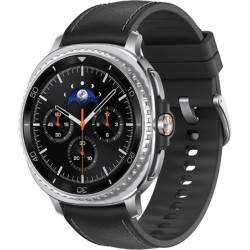
Specifications:
- OS: Wear OS 6 with One UI 8 Watch
- Display: 1.3″ Super AMOLED
- Battery Life: Up to 40 hours
- Water Resistance: 5 ATM + IP68
- Connectivity: Bluetooth 5.3, Wi-Fi, LTE
- Key Feature: Physical rotating bezel
- Compatibility: Android 10 or later
The Galaxy Watch 8 Classic shares the same communication capabilities as the standard Watch 8 but adds a physical rotating bezel for navigating notifications and menus without touching the screen. For managing a high volume of texts and calls, this makes a genuine practical difference — scrolling through a long message thread or dismissing multiple notifications is faster and more reliable with a physical dial than with touch input alone.
Call quality and text reply features are identical to the standard Watch 8. The Classic model’s larger case and premium build justify the price step up for users who spend significant time managing communications from their watch throughout the day.
| Pros | Cons |
| Physical rotating bezel for fast notification navigation | More expensive than the standard Watch 8 |
| Full Wear OS call and text feature set | Heavier than standard Watch 8 |
| Premium stainless steel build | |
| LTE option available |
4. OnePlus Watch 2R — Best Battery Life on Wear OS for Communication
Score: 8.7/10
Best for: Users who need reliable call and text support without daily charging
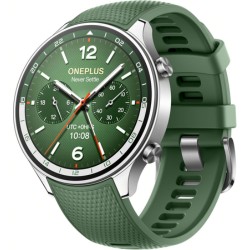
Specifications:
- OS: Wear OS 4
- Display: 1.43″ AMOLED
- Battery Life: Up to 100 hours (Smart Mode) / 48 hours (full Wear OS)
- Water Resistance: 5 ATM + IP68
- Connectivity: Bluetooth 5.3, Wi-Fi
- Call Support: Built-in speaker and mic
- Compatibility: Android 6 or later
The OnePlus Watch 2R solves the battery problem that makes most Wear OS watches impractical for light-to-medium communication users. In full Wear OS mode with notifications, call support, and always-on display disabled, most users see 3 to 4 days of real-world use — compared to the 1 to 1.5 days delivered by the Galaxy Watch 8 or Pixel Watch 4 under similar conditions.
Call and text functionality is fully intact. The built-in speaker handles Bluetooth calls clearly, voice-to-text works reliably with Google Assistant, and full message content from WhatsApp, Gmail, and Android Messages displays and replies without issues.
The trade-off is that it lacks LTE support, meaning your phone must be within Bluetooth range for calls to route through the watch. For most office workers and everyday users, that limitation is rarely relevant. For users who regularly leave their phone behind, the Pixel Watch 4 or Galaxy Watch 8 LTE is a better fit.
| Pros | Cons |
| Best real-world battery life among Wear OS watches | Less refined software than Samsung or Google |
| Full Wear OS call and text support | |
| Comfortable for all-day and sleep wear | |
| Competitive price for the feature set |
5. Samsung Galaxy Watch FE — Best Budget Android Smartwatch for Calls and Texts
Score: 8.4/10
Best for: First-time smartwatch buyers who want reliable communication features under $250
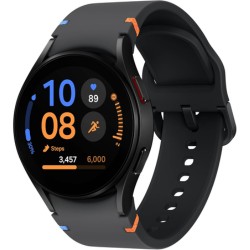
Specifications:
- OS: Wear OS with One UI Watch
- Display: 1.2″ Super AMOLED
- Battery Life: Up to 30 hours
- Water Resistance: 5 ATM + IP68
- Connectivity: Bluetooth 5.0, Wi-Fi
- Call Support: Built-in speaker and mic
- Compatibility: Android 10 or later
The Galaxy Watch FE brings the core Samsung Wear OS communication experience to the most accessible price in Samsung’s lineup. Texting features include full keyboard input, voice-to-text, and quick replies. Call quality from the built-in speaker is solid for brief conversations. Notifications from WhatsApp, Messages, and Gmail arrive reliably and display full message content.
The compromises relative to the Watch 8 are real but manageable: no LTE option, slightly older Bluetooth version, and no physical rotating bezel. Battery life at around 30 hours means daily charging for most users. For someone who primarily wants to read texts, dismiss notifications, and occasionally take a call from their wrist without spending $300 or more, the Watch FE delivers those basics cleanly.
| Pros | Cons |
| Lowest price entry into Samsung Wear OS | No LTE |
| Full call and text reply support | 30-hour battery needs daily charging |
| 5 ATM water resistance | |
| AMOLED display at this price is strong value |
6. TicWatch Pro 5 — Best for Heavy App and Communication Users
Score: 8.3/10
Best for: Power users who want maximum Wear OS app support alongside strong communication features
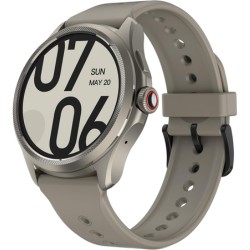
Specifications:
- OS: Wear OS 3 (Snapdragon W5+ Gen 1)
- Display: 1.43″ AMOLED
- Battery Life: Up to 80 hours (Essential Mode) / 24 hours (full Wear OS)
- Water Resistance: 5 ATM + IP68
- Connectivity: Bluetooth 5.2, Wi-Fi, NFC
- Call Support: Built-in speaker and mic, supports phone calls
- Compatibility: Android 8 or later
The TicWatch Pro 5 runs on the Snapdragon W5+ Gen 1 platform, which is the fastest processor currently available in a Wear OS watch outside of the Galaxy and Pixel lineup. For users who run multiple messaging apps — WhatsApp, Telegram, Slack, and Gmail simultaneously — the TicWatch Pro 5 handles multi-app notification management without the lag that affects mid-range Wear OS devices.
Call quality is above average, and the microphone performs well in moderate ambient noise. Full Gboard keyboard support, voice-to-text, and quick replies all work reliably. The dual-layer display, which switches to a low-power monochrome mode to extend battery life, is a practical feature for users who want longer standby without losing core functions.
| Pros | Cons |
| Fastest processor in this price range | Wear OS 3 rather than newer Wear OS 4 |
| Handles multiple messaging apps without lag | Bulkier than Samsung or Google options |
| 80-hour battery in Essential Mode | |
| Strong call quality |
7. Amazfit Balance 2 — Best Battery Life With Bluetooth Calling
Score: 8.1/10
Best for: Users who want 14+ day battery life with Bluetooth calling support
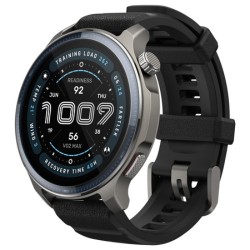
Specifications:
- OS: Zepp OS (proprietary)
- Display: 1.5″ AMOLED
- Battery Life: Up to 14 days (typical use with Bluetooth calling)
- Water Resistance: 5 ATM
- Connectivity: Bluetooth 5.3, Wi-Fi
- Call Support: Bluetooth calling via phone connection
- Compatibility: Android 7 or later, iOS 14 or later
The Amazfit Balance 2 belongs to a different category than Wear OS watches and is important to understand correctly before buying. It runs Zepp OS, a proprietary system that prioritizes battery life and health tracking over app flexibility. It does not support full Wear OS apps, keyboard text replies, or independent call handling.
What it does offer is Bluetooth calling, where incoming calls are routed through the watch’s speaker and microphone using your phone’s connection, and basic notification display with quick reply presets for common messaging apps. For users who primarily want to see texts and take brief calls without charging every day, the Balance 2’s 14-day battery is a compelling trade-off.
If full text reply capability matters to you, this is not the right pick. If battery life is your primary concern and you are comfortable with quick replies only, the Amazfit Balance 2 delivers communication basics far longer than any Wear OS option.
| Pros | Cons |
| 14-day battery with Bluetooth calling active | No full keyboard text reply |
| AMOLED display with strong sunlight readability | No Wear OS app compatibility |
| 5 ATM water resistance | |
| Competitive price for battery and display quality |
8. Garmin Venu 3 — Best for Active Users Who Need Communication Features
Score: 8.0/10
Best for: Fitness-focused users who want reliable notification management alongside advanced health tracking
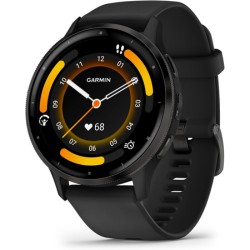
Specifications:
- OS: Garmin OS (proprietary)
- Display: 1.4″ AMOLED (45mm)
- Battery Life: Up to 14 days (smartwatch mode)
- Water Resistance: 5 ATM
- Connectivity: Bluetooth 5.0, Wi-Fi
- Call Support: Bluetooth calling via phone connection
- Compatibility: Android and iOS
The Garmin Venu 3 is the best choice for users who use their smartwatch primarily for fitness tracking but also want dependable text notifications and call handling. Like the Amazfit Balance 2, it runs a proprietary OS and supports Bluetooth calling rather than standalone call capability. Text reply is limited to quick replies and voice messages — no full keyboard input.
Where the Venu 3 stands out is in the quality of its health data, the stability of its Bluetooth connection over long distances, and its battery consistency. Notification delivery is more reliable than most budget Android smartwatches, and the display is bright enough for outdoor use. For users who run, swim, or cycle daily and want a watch that handles fitness first but stays connected for communication basics, the Venu 3 is the cleaner choice over a Wear OS watch.
| Pros | Cons |
| Industry-leading GPS and fitness tracking accuracy | No full text reply — quick replies only |
| 14-day battery in smartwatch mode | Expensive for a watch with limited texting features |
| Reliable Bluetooth call quality | |
| Extremely stable notification delivery |
How to Choose the Right Android Smartwatch for Calls and Texts
Wear OS vs. Proprietary OS: The Most Important Decision First
This is the spec that determines how much you can actually do from your wrist. Wear OS watches (Samsung Galaxy Watch 8, Google Pixel Watch 4, OnePlus Watch 2R, TicWatch Pro 5, Galaxy Watch FE) support full keyboard text replies, voice-to-text through Google Assistant, and third-party app replies including WhatsApp, Telegram, Slack, and Gmail. You can genuinely manage your messages from your wrist.
Proprietary OS watches (Amazfit Balance 2, Garmin Venu 3) support Bluetooth calling and basic notification display, but text replies are limited to preset quick replies or short voice messages. These are excellent watches, but the texting experience is fundamentally more limited.
If replying to texts from your wrist is a daily need, only a Wear OS watch delivers that reliably.
Bluetooth Calling vs. LTE Calling: What’s the Real Difference
Bluetooth calling routes incoming and outgoing calls through the watch using your phone’s cellular connection via Bluetooth. Your phone must be within roughly 30 feet. This covers the vast majority of daily use cases.
LTE calling allows the watch to make and receive calls using its own cellular connection, completely independent of your phone. This requires a data plan from your carrier — typically $5 to $15 per month — and your watch gets its own number or shares your phone’s number depending on the carrier.
For most users, Bluetooth calling is sufficient. If you regularly exercise without your phone, LTE calling is worth the extra cost. The Samsung Galaxy Watch 8 and Pixel Watch 4 both offer LTE variants.
What “Text Reply” Actually Means at This Price Level
There are three distinct levels of text reply functionality currently available on Android smartwatches, and the listing won’t always tell you which one applies:
- Quick replies only: Pre-written responses like “On my way” or “Talk later.” Available on almost all smartwatches including budget fitness trackers.
- Voice-to-text: Dictate a reply and the watch sends it. Available on most Wear OS watches and some higher-end fitness watches.
- Full keyboard input: Type a reply character by character using Gboard on the watch screen. Available only on Wear OS watches with a current Gboard installation (Galaxy Watch 8, Pixel Watch 4, OnePlus Watch 2R, TicWatch Pro 5).
Most people searching for “Android smartwatch for texting” want the third option. Verify this before buying any watch outside the Wear OS category.
WhatsApp, iMessage, and Third-Party App Compatibility
WhatsApp on Android Wear OS watches now supports full message display, voice-to-text replies, quick replies, and emoji responses. Typed keyboard replies require Gboard to be set as the default input on the watch. Samsung Galaxy Watch 8, Pixel Watch 4, and TicWatch Pro 5 all support this.
iMessage does not work on Android smartwatches in any meaningful way. If you regularly receive iMessages from iPhone contacts, those messages will show as SMS on your Android device and will display normally on your watch.
Telegram, Slack, and Gmail all support notification display and voice reply on current Wear OS watches.
Frequently Asked Questions
Which Android smartwatch has the best calling quality in 2026?
The Samsung Galaxy Watch 8 and Google Pixel Watch 4 both deliver the clearest call quality currently available on Android smartwatches. Both have built-in speakers with noise reduction, and both support LTE variants for calls without your phone present. The Galaxy Watch 8 edges ahead slightly for calls in noisy environments based on microphone pickup.
Can I reply to WhatsApp messages from an Android smartwatch?
Yes, fully. On Wear OS watches running Wear OS 4 or later — including the Galaxy Watch 8, Pixel Watch 4, and OnePlus Watch 2R — you can reply to WhatsApp messages using voice-to-text, quick replies, or a full Gboard keyboard. This requires WhatsApp to be installed on your paired Android phone and the Wear OS WhatsApp companion app on the watch.
Does an Android smartwatch need a SIM card to make calls?
Not for Bluetooth calling, which routes calls through your phone. A SIM card or eSIM is only required if you want the LTE variant to make calls independently without your phone. LTE variants of the Galaxy Watch 8 and Pixel Watch 4 support eSIM, meaning no physical SIM card is inserted — your carrier activates the cellular plan remotely.
Can I text on an Android smartwatch without a phone nearby?
With a Wear OS watch and a Wi-Fi connection, you can send and receive messages through apps that sync over Wi-Fi when your phone is out of Bluetooth range. For fully independent texting without any phone connection, you need an LTE watch and an active cellular plan.
Will an Android smartwatch work with my iPhone?
Wear OS watches have limited iPhone compatibility. Basic notifications display on some models when paired with an iPhone, but full text reply, call handling, and most Wear OS apps require an Android phone. If you use an iPhone, an Apple Watch is the correct choice for full communication functionality.
Is there a monthly fee for using an Android smartwatch for calls?
For Bluetooth calling — which routes calls through your phone — there is no additional fee. For LTE calling, your carrier charges an additional monthly fee, typically $5 to $15, to activate a cellular plan on the watch. This applies only if you purchase the LTE variant.
How long do Android smartwatch batteries last with calls and notifications active?
Battery life drops significantly when calls and continuous notifications are active. The Galaxy Watch 8 delivers 25 to 35 hours under typical communication load. The Pixel Watch 4 (45mm) reaches 36 to 45 hours. The OnePlus Watch 2R delivers 40 to 50 hours under similar conditions, making it the longest-lasting Wear OS option. The Amazfit Balance 2 and Garmin Venu 3, running proprietary OS, reach 10 to 14 days even with Bluetooth calling active.
What is the cheapest Android smartwatch that supports full text replies?
The Samsung Galaxy Watch FE at $149 to $179 is currently the most affordable Wear OS watch with full keyboard text reply support, voice-to-text, and Bluetooth call handling from a credible brand. Generic sub-$50 smartwatches advertise texting features but typically only support notification display and quick reply presets.
Final Thoughts
For most Android users who want to manage texts and calls from their wrist, the Samsung Galaxy Watch 8 covers the full range of communication features at a competitive price. The display is readable in any light, call quality is excellent, full text replies work across every major messaging app, and the Wear OS 6 experience is the most polished available in 2026.
If battery life is the deciding factor, the OnePlus Watch 2R delivers genuine multi-day use with complete Wear OS communication features at a lower price.
If you want the simplest pairing experience and the best Google ecosystem integration, the Google Pixel Watch 4 is the cleaner choice, especially with a Pixel phone.
For a full side-by-side comparison of pricing, sensors, and fitness features across budget and mid-range options, see Tigeristic’s Best Smartwatches Under $50 roundup and the Smartwatch vs Fitness Tracker guide for help deciding which category is right for you.